
AI Image and Video Tools for Marketing: The 2026 Creative Stack That Cuts Cost and Time
A 30-second ad that once cost $10,000 and two weeks of production can now be made for a few dollars in minutes. This guide to AI tools for marketing breaks down the best AI image and video tools for ad creatives, social visuals, and video — by job, budget, and skill level.

AI image tools generate ad creatives and social visuals from a text prompt, while AI video tools turn scripts, blog posts, or product URLs into finished marketing videos. According to the U.S. Small Business Administration, small teams that automate creative production can reinvest the time saved into testing and distribution — exactly what a lean AI stack makes possible.
Why AI Creative Tools Are Taking Over Marketing
Video and AI-generated imagery aren’t a side channel anymore — they’re the default format for ads, product pages, and social feeds. The shift is driven by two things at once: audiences respond better to video, and AI has collapsed the cost of making it.
The numbers behind the shift
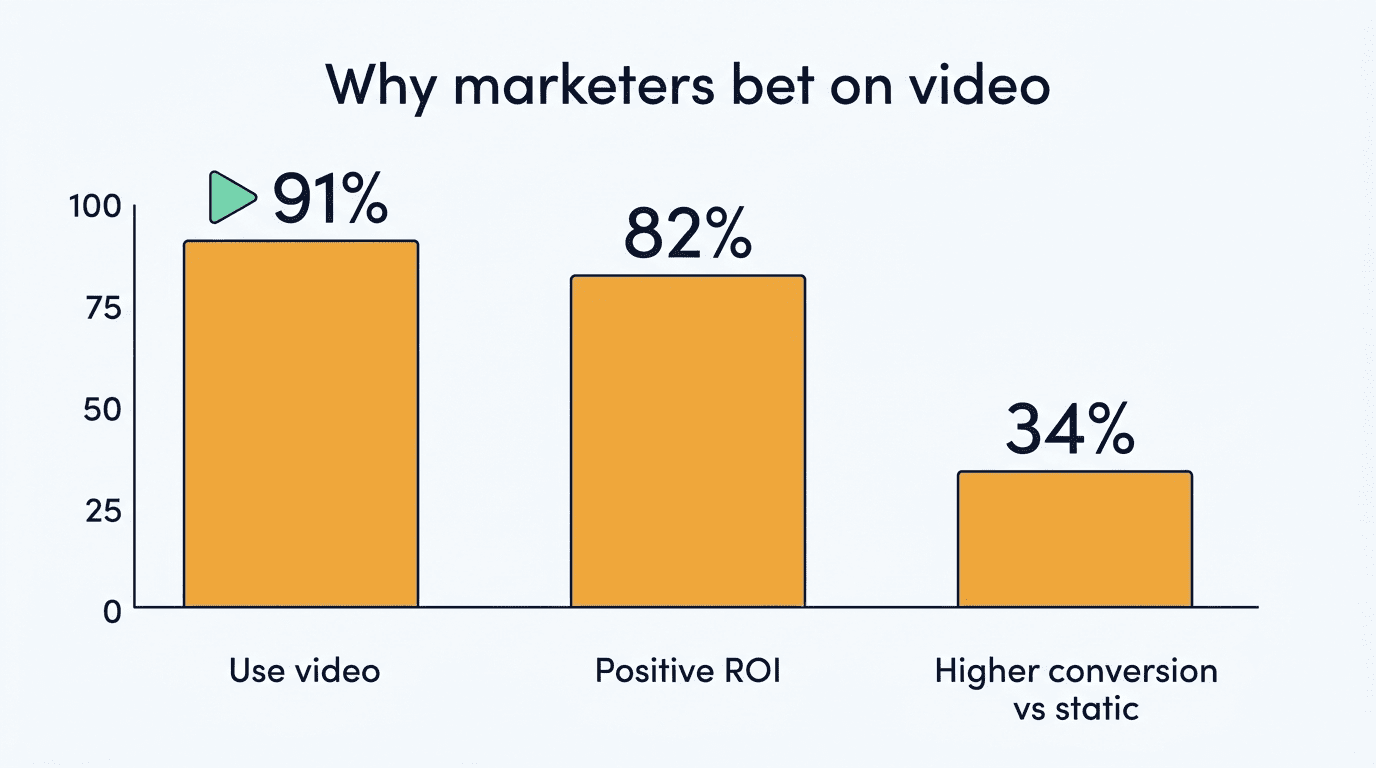
91% of businesses now use video as a marketing tool, 82% say video marketing gives them a good return on investment, and 85% of people say they’ve been convinced to buy a product or service after watching a video, according to Wyzowl’s annual State of Video Marketing survey. Landing pages with AI-generated explainer video convert about 34% higher than text-only pages, and personalized video used in email can lift click-through rates by up to 300% compared to static images or text links.
Cost and speed collapse
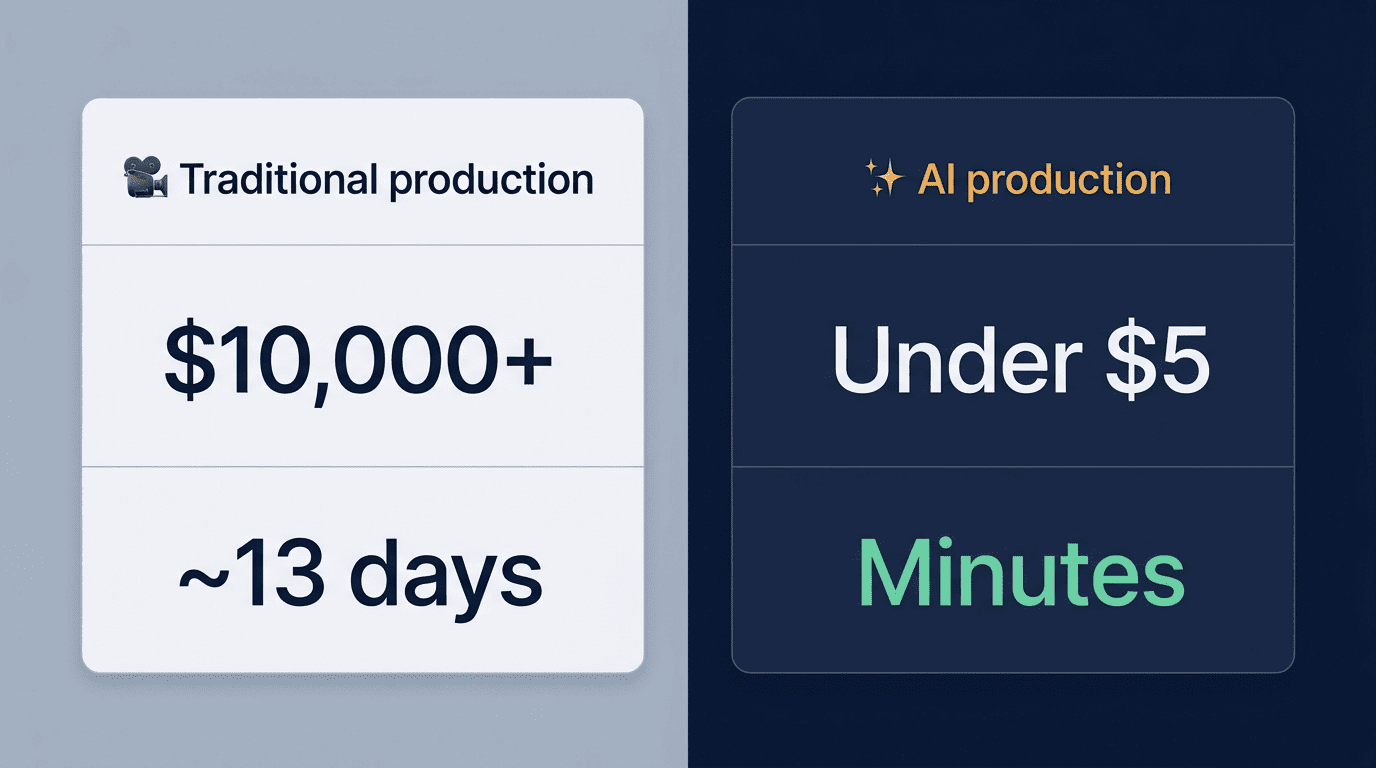
A traditionally produced 30-second ad runs $10,000–$50,000, with a freelance videographer charging $800–$1,200 per day and a production timeline stretching close to two weeks. AI video and image tools produce comparable clips and creatives for under $5 in minutes, and AI-assisted editing has cut production timelines by roughly 85% since 2024. Lack of time is still the single most-cited barrier to video production for marketing teams — which is precisely the bottleneck these tools remove.
Where the biggest savings usually show up:
- Storyboarding and scripting time, since a prompt replaces a creative brief
- Shoot days, since there’s no crew, location, or talent to book
- Revision cycles, since regenerating a clip takes minutes instead of a reshoot
- Localization cost, since avatar tools dub into dozens of languages from one source video
The Best AI Image Tools for Marketing
Image generation was the first part of the AI creative stack to mature, and it now covers everything from concept art to batch-produced ad variations.
Ad creatives and social visuals
Midjourney leads on artistic quality for concept art and social imagery — it’s the tool creative directors reach for when a campaign needs a distinct visual identity. Canva AI (Magic Media) is the fastest option for on-brand social graphics, since it works inside templates your team already uses. AdCreative.ai and Stable Diffusion-based tools sit a step further down the funnel, generating conversion-optimized ad images and open-weight image variations at scale.
Brand-safe and batch production
Adobe Firefly is trained only on licensed Adobe Stock content and public-domain material, and Adobe backs commercial use with IP indemnification — making it the safest default for regulated brands and enterprise legal teams. Getimg.ai runs a leaner catalog of roughly 15 models with batch sizes of 2–10 images depending on plan, starting around $8/month on annual billing, which suits teams that need repeatable volume rather than a single hero image.
| Tool | Best for | Starting price |
|---|---|---|
| Midjourney | Artistic concept and social imagery | ~$10/mo |
| Canva AI (Magic Media) | Fast, on-brand social graphics | Free tier available |
| Adobe Firefly | Brand-safe, IP-indemnified images | Free tier / paid plans |
| Getimg.ai | Batch production, ~15 models | ~$8/mo |
| AdCreative.ai | Conversion-optimized ad creatives | Paid, quote-based |
The Best AI Video Tools for Marketing
Video tools now split into three clear categories: cinematic generative video, avatar-led spokesperson video, and tools that repurpose existing content into new clips.
Cinematic text-to-video
Google Veo 3.1, built by Google DeepMind, is the strongest all-around generative video model available. Google’s AI Pro plan runs $19.99/month and includes 1,000 monthly credits — enough for roughly 100 Veo 3.1 Lite clips, 50 Fast clips, or 10 full-quality renders — while accounts without a paid plan still get a smaller monthly credit allowance for free. Runway’s Gen-4 model produces cinematic, physics-aware shots starting around $12–15/month on the Standard plan. Sora, OpenAI’s text-to-video model, generates clips up to 60 seconds long, though OpenAI discontinued the standalone Sora consumer app in April 2026 and folded the technology into other products.
Avatar and spokesperson video
Synthesia creates avatar-led videos in 140+ languages using 230+ AI avatars and is used by more than 90% of the Fortune 100, with Starter plans running around $18–29/month. HeyGen covers 175+ languages and near-instant voice cloning and dubbing on its Creator plan (~$29/month, 1080p), with 4K avatar export unlocked on the Pro plan (~$49/month). Both replace the studio, camera, and talent budget with a script and a render queue.
Repurposing and editing
Pictory converts blog posts and scripts into branded videos with auto-generated captions, starting around $19–29/month — a direct fit for teams that already publish long-form content. InVideo AI builds social videos from a single prompt using a library of 5,000+ templates and millions of stock assets, starting around $25/month. Descript and VEED.io edit video the way you’d edit a document or a slide deck: cut a sentence from the transcript, and the matching clip disappears from the timeline.
| Tool | Category | Languages / output | Starting price |
|---|---|---|---|
| Google Veo 3.1 | Cinematic text-to-video | High-fidelity clips | Free tier / $19.99/mo |
| Runway (Gen-4) | Cinematic text-to-video | Physics-aware shots | ~$12-15/mo |
| Synthesia | Avatar/spokesperson video | 140+ languages, 230+ avatars | ~$18-29/mo |
| HeyGen | Avatar/spokesperson video | 175+ languages, 4K on Pro | ~$29/mo (4K ~$49/mo) |
| Pictory | Repurposing | Blog-to-video | ~$19-29/mo |
| InVideo AI | Repurposing | 5,000+ templates | ~$25/mo |
AI Tools Built Specifically for Ads and UGC
Turn a product URL into a scroll-stopping ad. Creatify takes a plain product URL and turns it into UGC-style video ads, then exports directly to Meta and TikTok ad formats, starting around $39/month. There’s no script to write or actor to hire — the tool pulls product images and copy from the page itself.
Built for volume, not one hero video. These tools exist for performance marketers who need dozens of ad variations to A/B test against each other, not a single polished brand film. UGC-style ads consistently outperform polished studio spots in social feeds, because they read as native content rather than advertising.
A UGC-focused ad tool typically bundles:
- A library of AI actors or presenters instead of a casting budget
- Auto-generated scripts pulled from the product page
- Direct export presets for Meta, TikTok, and YouTube Shorts
- Batch mode to produce several ad variations from one input
How to Build Your AI Creative Stack
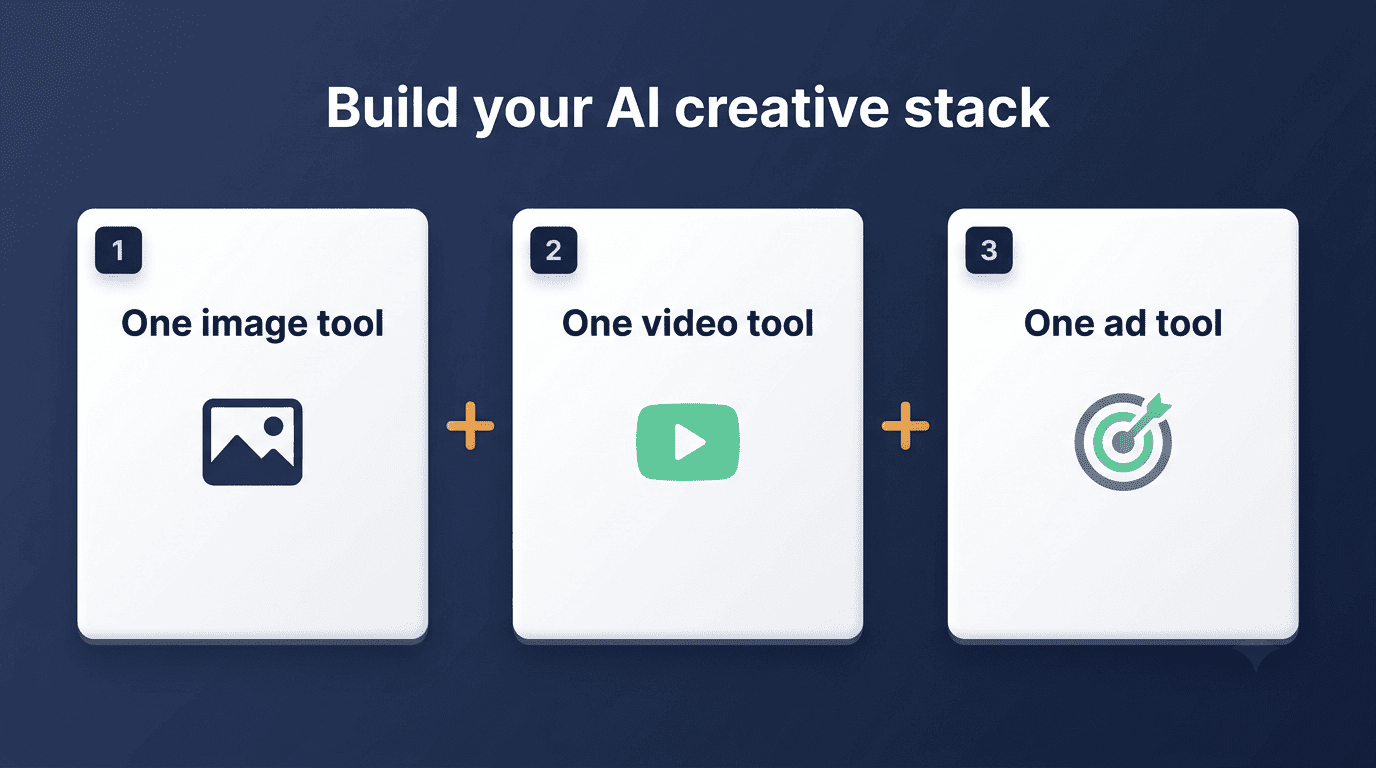
Don’t buy one platform to cover everything — image generation, cinematic video, avatar video, and ad-specific tools each solve a different job, and the tools that are best at one are rarely best at all four.
A simple way to get started:
- Pick one image tool — Adobe Firefly if brand safety and IP indemnification matter, or Canva AI if speed and templates matter more.
- Pick one general video generator — Google Veo or Runway for cinematic quality, Synthesia or HeyGen if you need a spokesperson avatar.
- Pick one repurposing tool — Pictory or InVideo AI to turn existing blog and social content into video.
- Add one ad-specific tool only if you’re running paid social at volume — Creatify or AdCreative.ai for UGC-style and image ad variations.
- Start every tool on its free or trial tier before paying for anything.
- Set a review step where a human checks brand fit, accuracy, and rights before publishing.
- Track which tool actually gets used after 30 days, and drop the ones that don’t.
Most tools on this list have a free or trial tier worth using before committing. Upgrade only when volume, resolution, or commercial and watermark-free rights justify the cost — entry-level paid plans generally run $8–$39 per month, a fraction of what a single traditionally produced ad used to cost.
Limits and Brand Safety
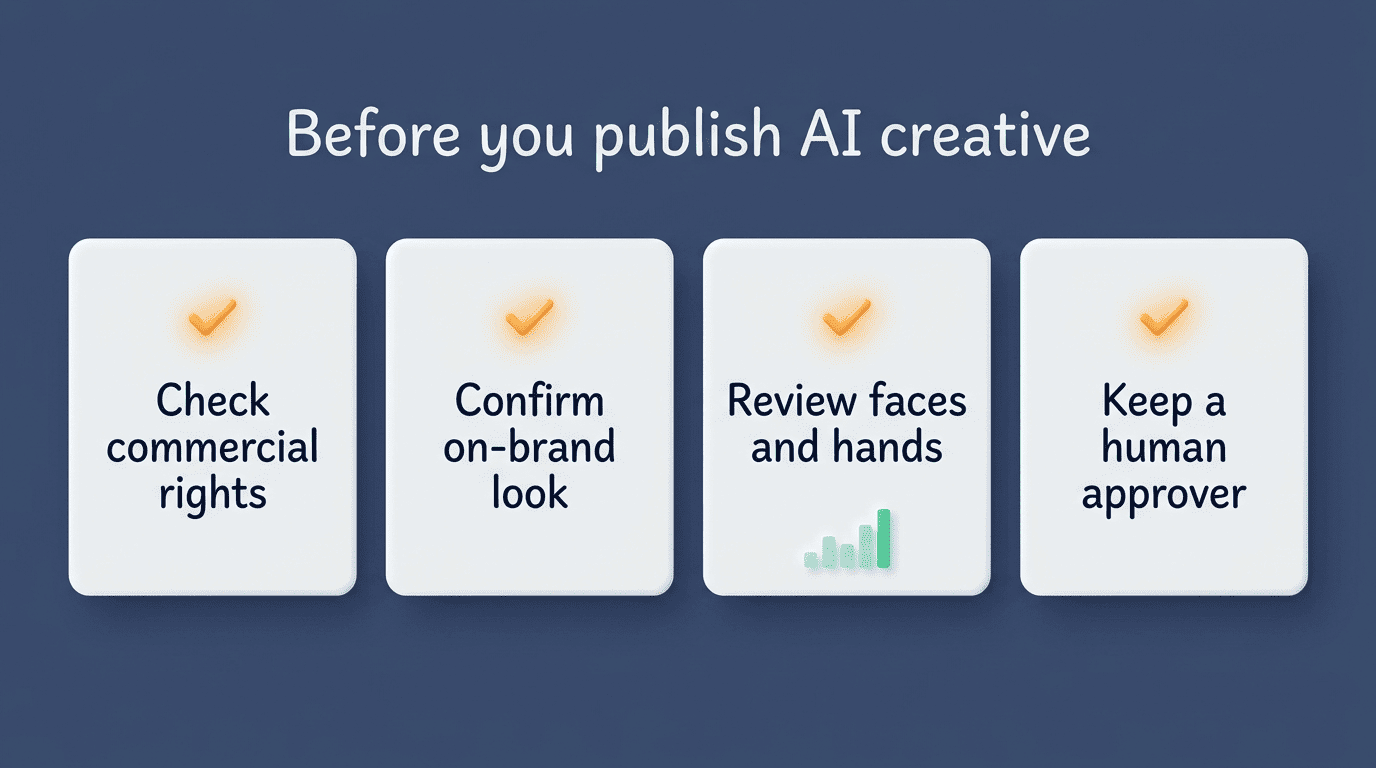
AI-generated images and video are not yet a replace-and-forget solution. Faces and hands are still the most common failure point in AI images, and outputs can drift off-brand if a prompt isn’t specific enough about color, tone, or product detail. Not every tool grants full commercial rights or a watermark-free export by default, so it’s worth checking the license terms before a generated asset goes into a paid campaign.
91% of businesses use video as a marketing tool – back to joint all time highs after a slight dip in 2025.Wyzowl, State of Video Marketing Report
For regulated industries, financial services, or any big-budget campaign, favor IP-indemnified tools like Adobe Firefly, and treat every AI-generated asset as a draft rather than a finished creative. A short checklist before anything ships:
- Faces, hands, and text within the image render correctly
- The output matches brand colors, tone, and product accuracy
- The license covers commercial use and removes watermarks
- A human has reviewed the final asset, not just the prompt
Related AI marketing guides
Building a full stack? Explore AI content marketing tools and AI social media marketing tools to round out your marketing workflow.
Frequently Asked Questions
What are the best AI video tools for marketing?
For cinematic video: Google Veo and Runway. For avatars and spokesperson video: Synthesia and HeyGen. For repurposing and social: Pictory and InVideo AI. For ads and UGC: Creatify.
Can AI generate marketing images and videos?
Yes. AI image tools like Midjourney, Adobe Firefly, and Canva AI create ad creatives and social visuals from prompts, and AI video tools like Runway, Google Veo, and Synthesia generate finished marketing videos from scripts, blog posts, or product URLs.
What is the best AI tool for creating ads?
For image ad creatives, AdCreative.ai and Canva AI; for UGC-style video ads, Creatify; for scaled variations to A/B test, ad-specific generators tend to outperform all-purpose tools.
Are AI-generated videos good for marketing?
Yes — AI-generated explainer videos convert about 34% higher than text-only pages and 82% of businesses report positive video ROI, but outputs still need human review for brand fit and accuracy.
How much do AI image and video tools cost?
Most start free or on a trial; entry-level paid plans run roughly $8-$39 per month, versus $10,000 or more for a traditionally produced 30-second ad.
Which AI image tool is safest for brands?
Adobe Firefly, trained only on licensed Adobe Stock content with IP indemnification, is generally the safest choice for regulated or enterprise brands.